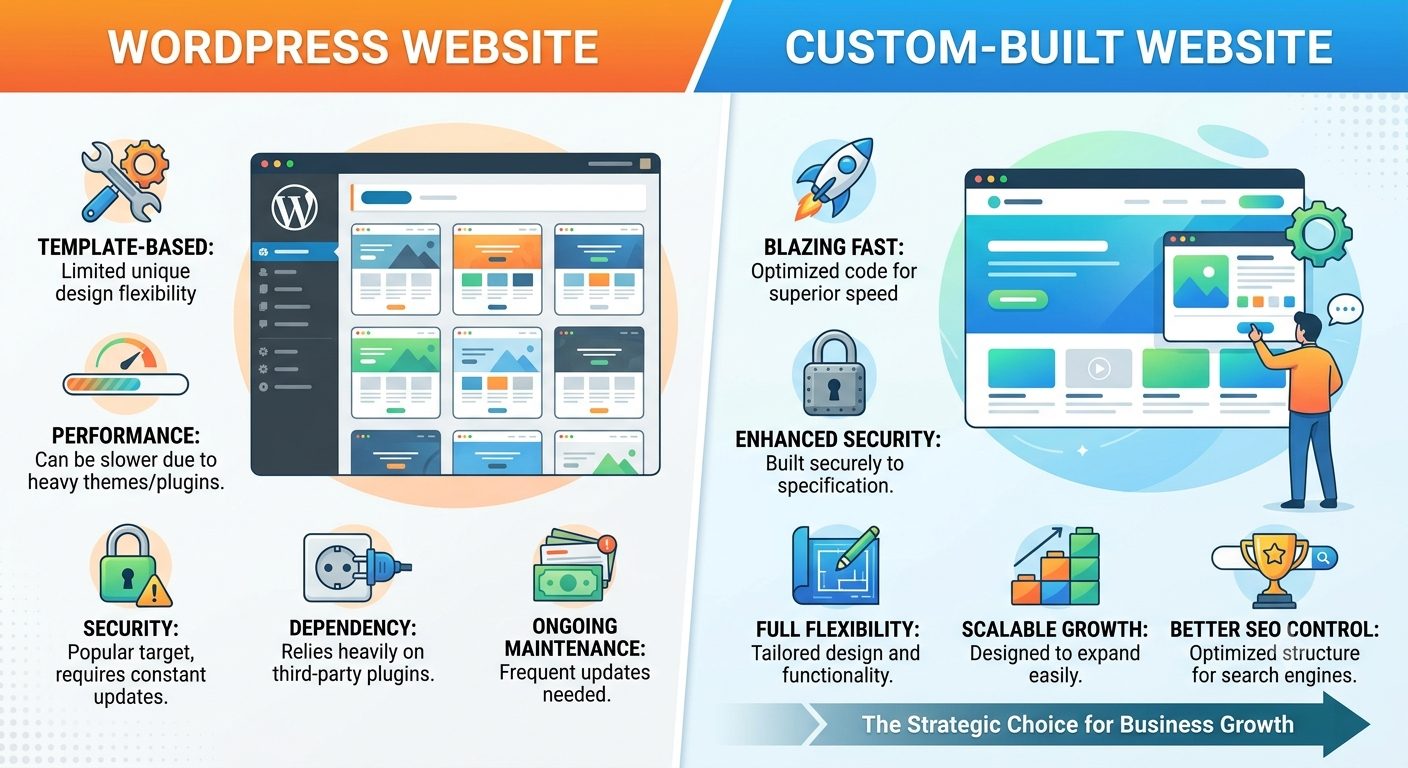
You have two proposals in front of you. One is for a WordPress site, and the price tag is lower. The second is for a custom build, and the price tag is higher. If you only compare the upfront cost at the moment of signing, the decision seems already made.
But it isn't. To put it briefly before diving into the details: WordPress is usually cheaper to build, slower to load, and more expensive to maintain. A custom site is the exact opposite. Which one matters most to you depends on which of these three factors will impact your business the most. Let's break it down one by one.
First, let's honestly define what is what — without this, the comparison is worth very little.
Term | Plain-language meaning |
|---|---|
WordPress | A free platform businesses use by stacking a theme, page builder, and plugins on top of its core to assemble a site from pre-made parts |
Theme | A pre-made visual shell for a WordPress site — layout, fonts, colours. Usually ships with features you'll never use |
Plugin | An add-on that gives WordPress extra functionality (forms, SEO, security, backups, etc.). Most serious ones are paid and renew annually |
Custom website | A site written to your specific requirements, without a theme or plugin ecosystem |
Page builder | A drag-and-drop WordPress tool (e.g. Elementor, Divi) that adds its own code to every page of the site |
Core Web Vitals | Google's public performance thresholds — three metrics for load speed, responsiveness, and layout stability |
CDN | Content Delivery Network — a global network of servers that serves your pages from the location closest to each visitor |
Cache | A stored copy of a page that skips server work on repeat visits — fast, but not always current and doesn't cover all pages |
WordPress, in the form used by most businesses, is a collection of separate pieces: the core, a theme, a page builder, and plugins for everything else. The site is assembled from pre-made blocks. A custom site is coded specifically for your precise tasks — without a pre-built theme and without an ecosystem of plugins. The trade-off is obvious: assembling from ready-made parts is faster and cheaper than building to order. This is true, and that is exactly why WordPress wins at the starting line.
Speed: Why They Load Differently
This is the axis that is underestimated most often — which is why it comes first.
When a visitor opens an uncached page on WordPress, the server runs PHP and queries the database to assemble the HTML, and only then delivers it. A caching plugin can save the result and skip this work — until the cache clears, or until a page comes up that the cache covers poorly, or until one plugin starts conflicting with another. A custom site can deliver pre-rendered pages directly from a Content Delivery Network (CDN) right next to the visitor — with almost zero server workload. Less work per request means a faster Time to First Byte (TTFB).
But that is just the beginning of the gap. The main issue is what actually gets shipped to the browser. A theme is built to fit many different types of sites, so it includes styles and scripts for features you don't even use. A page builder adds its own heavy CSS and JavaScript to every single page. Each plugin typically loads its styles and scripts across the entire site — whether a specific page needs them or not. Ten plugins mean ten extra sets of files that the browser must download, parse, and execute before displaying your page. A custom build delivers only the code that this specific page actually needs, and nothing more.
Google measures this through Core Web Vitals, and the thresholds are completely transparent:
Largest Contentful Paint (LCP): under 2.5 seconds
Interaction to Next Paint (INP): under 200 milliseconds
Cumulative Layout Shift (CLS): under 0.1
Plugin-heavy WordPress sites most often fail the first two: render-blocking CSS and heavy JavaScript push rendering and responsiveness past the acceptable thresholds. A lightweight custom site controls exactly what loads, so hitting these metrics is a matter of discipline, not luck.
A quick reality check: the underlying technology doesn't solve everything on its own. A carefully assembled WordPress site with minimal plugins can be fast, while a sloppy custom build can be slow. But the entire WordPress model — universal themes, site-wide plugins — naturally gravitates toward extra weight, whereas custom code pulls in the opposite direction. You are choosing which default direction your project leans toward.
Upfront Price: Where WordPress Usually Wins
Assembling from ready-made parts is cheaper than writing code from scratch. This is the sole reason why WordPress dominates the lower price segment, and it is a perfectly good reason.
Building a simple business website on WordPress is cheaper than an equivalent custom one — sometimes significantly cheaper. If your budget doesn't stretch to a custom build, a well-made WordPress site is clearly better than having no website at all, and there is no arguing with that. Just clearly understand what is included in that lower build price and what isn't — which brings us to the next two sections.
Why a WordPress Site Has a Monthly Bill at All
WordPress itself is free. That is the headline that draws people in, and it is true — but only on the surface.
A functional business website on WordPress is actually a stack of separate products: the WordPress core, a theme, a page builder, and — where the costs truly pile up — plugins. Forms, SEO, caching, security, backups, image optimization, e-commerce, translations: each is a separate plugin, most serious ones are paid, and they will bill you annually whether you remember them or not.
The typical monthly breakdown for a modest business website:
Monthly cost item | WordPress | Custom site |
|---|---|---|
Hosting | $20–80 CAD | $20–60 CAD |
Plugin licenses (annualized) | $30–100 CAD | — |
Maintenance | $50–300 CAD | $30–100 CAD |
Total per month | $100–480 CAD | $50–160 CAD |
Hosting: WordPress requires more server resources than an equivalent custom site because every page view triggers PHP and database queries. Cheap $5 hosting exists — and that is exactly why so many WordPress sites feel sluggish.
Plugin licenses: Costs sneak up quietly. Each annual renewal looks small on its own, but a page builder, an SEO plugin, forms, security, and backups combined can easily total $500–$1,000 a year.
Maintenance: This line item is skipped most often — and that is a mistake. The core, the theme, and every single plugin constantly release updates, and these updates sometimes break one another. Someone has to install them, check the site afterward, and fix the conflicts. Skipping updates means letting the site gradually drift into serious security vulnerabilities.
Calculating Over Five Years: The Order Flips
The build cost is a one-time number. A website also has an ongoing monthly cost, and it behaves very differently across the two options. Add both up over a few years, and the ranking often flips.
WordPress | Custom site | |
|---|---|---|
Build cost | Lower | Higher |
Monthly running costs | $100–480 CAD | $50–160 CAD |
5-year maintenance spend | $6,000–28,800 CAD | $3,000–9,600 CAD |
Where the cost sits | Accumulates monthly, every month | Front-loaded at build time |
The price ranges overlap, so it is not a clear-cut victory for either side — and anyone showing you an absolute win is likely trying to sell you something. But the instinct that "WordPress is twice as cheap" holds true in the first month and quietly becomes false by the third year, which is typically where the two total costs intersect.
And this entire calculation assumes that maintenance is actually being done. Skipping it doesn't eliminate the expense; it just defers it into a complete rebuild or crisis management after something breaks or gets hacked — which is the most expensive maintenance plan of all.
When WordPress is Still the Right Choice
The honest answer is not "always go custom." WordPress is the better choice when:
You publish frequently, and your content team works in the editor daily. WordPress's writing and content management tools are mature, and retraining a team also costs time and money.
Your requirements closely match a well-supported existing theme. When the off-the-shelf pieces truly fit your business logic, you are paying for the speed of assembly — and you actually get it.
Today's budget is a hard constraint. A well-maintained WordPress site is a real asset for a business. Just make sure to budget for the maintenance rather than around it.
The common thread in all three cases: WordPress wins when its ready-made components closely match what you need. It starts losing the moment you pay every month for twenty different plugins and bend your business logic to fit what those plugins can do.
How to Actually Compare Two Proposals
Ask these questions to whoever is quoting you — whether it is a WordPress agency or a custom dev shop:
Speed: "What Core Web Vitals will the site show on an average mobile phone, and can you show me a live site you've built that hits these thresholds?" A real answer comes with a link, not promises.
Build price: "What is included in the build price, and what isn't?" Paid plugin setups, content population, and team training are common omissions.
Ongoing costs: "How much will this cost per month in the second year — hosting, every single license, and maintenance, itemized?" A proposal that cannot answer this gives you the price of a build, not the price of a running website.
Plugins: "How many plugins will be used, and how many of them are paid?" More than a dozen means both a recurring bill and a larger security attack surface — ask exactly which ones and why.
Maintenance: "What happens if we don't touch updates for six months?" The honest answer for WordPress is unpleasant, and you deserve to hear it before signing, not after.
The cheapest website is the one whose total cost of ownership you see upfront.
Tell us what you are building, and we will honestly tell you whether a custom build justifies its price for your specific case or if WordPress makes more sense. You will be speaking directly with the project manager who would run your project, not a salesperson.
Get in touchMore honest answers in our blog
We write the things most web studios won't put in writing — how to choose a developer, what a project really involves, and the questions most studios would rather you didn't ask. Browse the blog →