One engine instead of a plugin belt
A typical mid-size business website is put together roughly like this. There's a content management system. A plugin bolted on for SEO. Another for security. One more for backups, one for caching, one for forms. Analytics lives in a Google dashboard. Email goes through Mailchimp. Social posting runs through a separate service. Enquiries land in an inbox and get lost there. Eight places something can break. Eight invoices. Eight renewal dates. And nowhere you can see all of it at once. We went a different way and wrote our own engine on Laravel 13 and Vue 3. Not a plugin assembly, not a theme on top of someone else's CMS — our own code, running our own site and our clients' projects. Content, leads, analytics, CRM, marketing and security are domains in one codebase, not webhooks between five services. Here's what's inside, what it costs next to the usual options, and where the usual option is still the better call.
Glossary
| Term | Plain-language meaning |
|---|---|
| SSR (server-side rendering) | The page arrives from the server ready to display, instead of being assembled in the browser |
| SPA (single-page application) | An interface that updates in place without reloading the whole page |
| Driver abstraction | A swap-in layer — you can change the image processor or search engine without rewriting the app |
| First-party analytics | Visitor data collected and stored in your own database, not a vendor's |
| JSON-LD | Structured data that tells search engines what a page is about |
| RAG | A chatbot method where answers are pulled from your own published content |
| Plugin belt | The stack of paid add-ons a WordPress site needs to be production-ready |
| TCO (total cost of ownership) | What something actually costs over several years, not just to launch |
Architecture: three surfaces, one codebase
Underneath is a Laravel 13 monolith with three layers. The public site renders on the server through Blade, with plain JavaScript and no heavy front-end framework. The page arrives finished. Less code in the browser means a faster first paint. The admin panel is a full Vue 3 SPA on Pinia, vue-router and vue-i18n. The interface responds immediately and nothing reloads. Between them sits a service layer with drivers: image processing (GD, Imagick, VIPS), search (MySQL FULLTEXT or Elasticsearch), AI (Claude or Gemini). You can change the infrastructure without touching business logic. New sections get added quickly thanks to CRUD factories — createCrudApi on the client and the same Request → Resource → Policy pattern on the server. A new domain is hours of work, not days. For a client, that converts directly into what changes cost.
An editor that knows about SEO
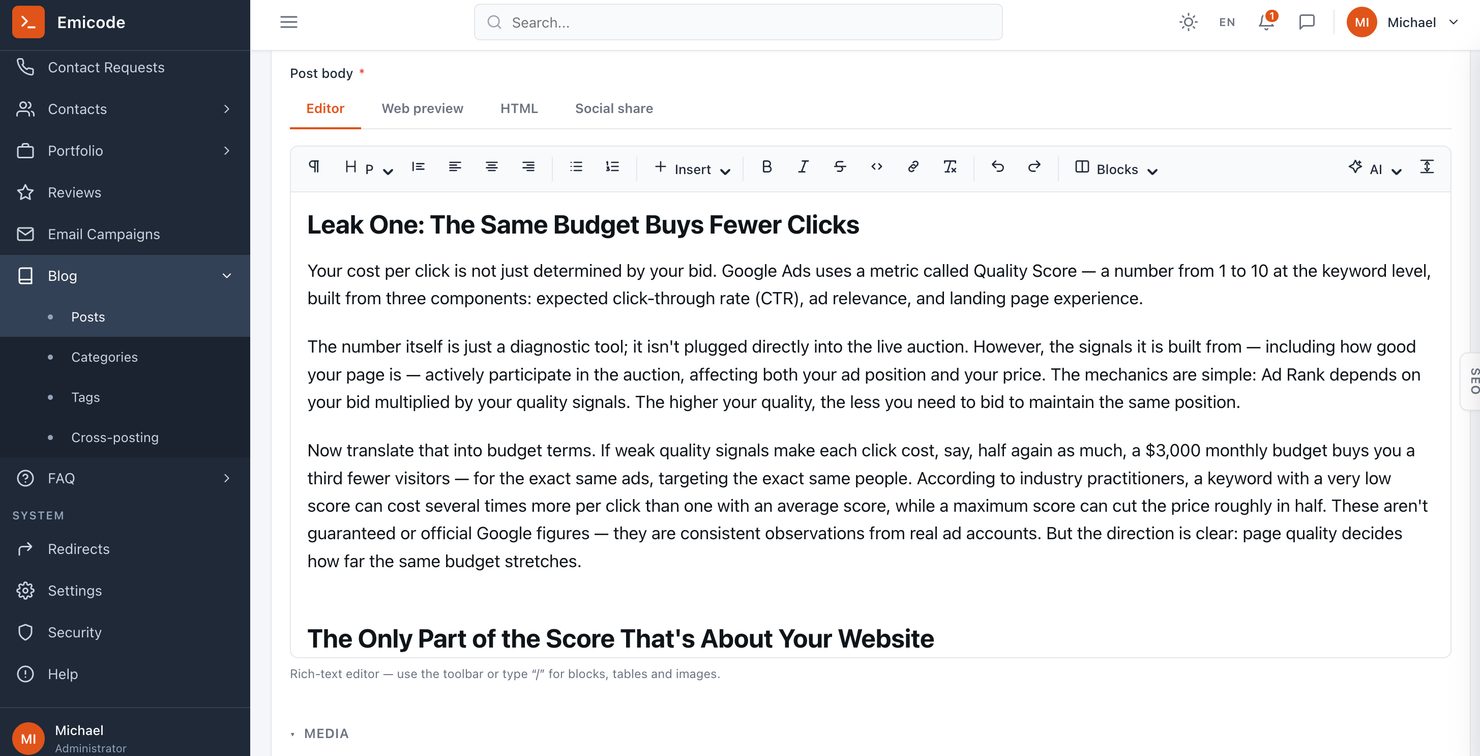
We wrote our own WYSIWYG. Not because we wanted to, but because the existing ones didn't do the job. It has a slash menu, a bubble menu, tables, embeds, and a built-in image cropper — you can crop a picture as you place it, without opening a photo editor. There are composite blocks: CTA cards, feature grids, tip and warning boxes. A marketer builds the page without a developer. The important part: the SEO panel and the social preview sit in the same window as the text. Not in a separate plugin, not on another tab. The writer sees how the piece will look in search results and in a social feed while writing it. AI actions live there too — rewrite, shorten, translate, adjust for SEO. Every request is logged with its cost, and the provider and budget are configurable. On WordPress that's a separate paid plugin, and it won't show you what you spent last month.
SEO and GEO: infrastructure that maintains itself
The sitemap, robots.txt, and JSON-LD markup for Organization and BlogPosting all generate automatically. They're wired to model observers and a scheduler, which means they update when content changes rather than when somebody remembers to press a button. Then there's verification meta for Google and Bing pulled from settings, per-page noindex, a managed robots_mode, an Atom feed for the blog, and conditional GET with ETag — an unchanged page returns 304 and doesn't burn crawl budget. AI search deserves its own note. We have separate controls for AI bots and an llms.txt file in automatic or custom mode. Most SEO plugins still don't handle this, and search behaviour has shifted noticeably toward assistants over the past two years. And redirects. Change an article slug and the 301 rule writes itself. If that page was moved before, the redirect chain gets repointed and loops removed. It's dull machinery that quietly costs most sites traffic for months before anyone notices.
Analytics that stay with you
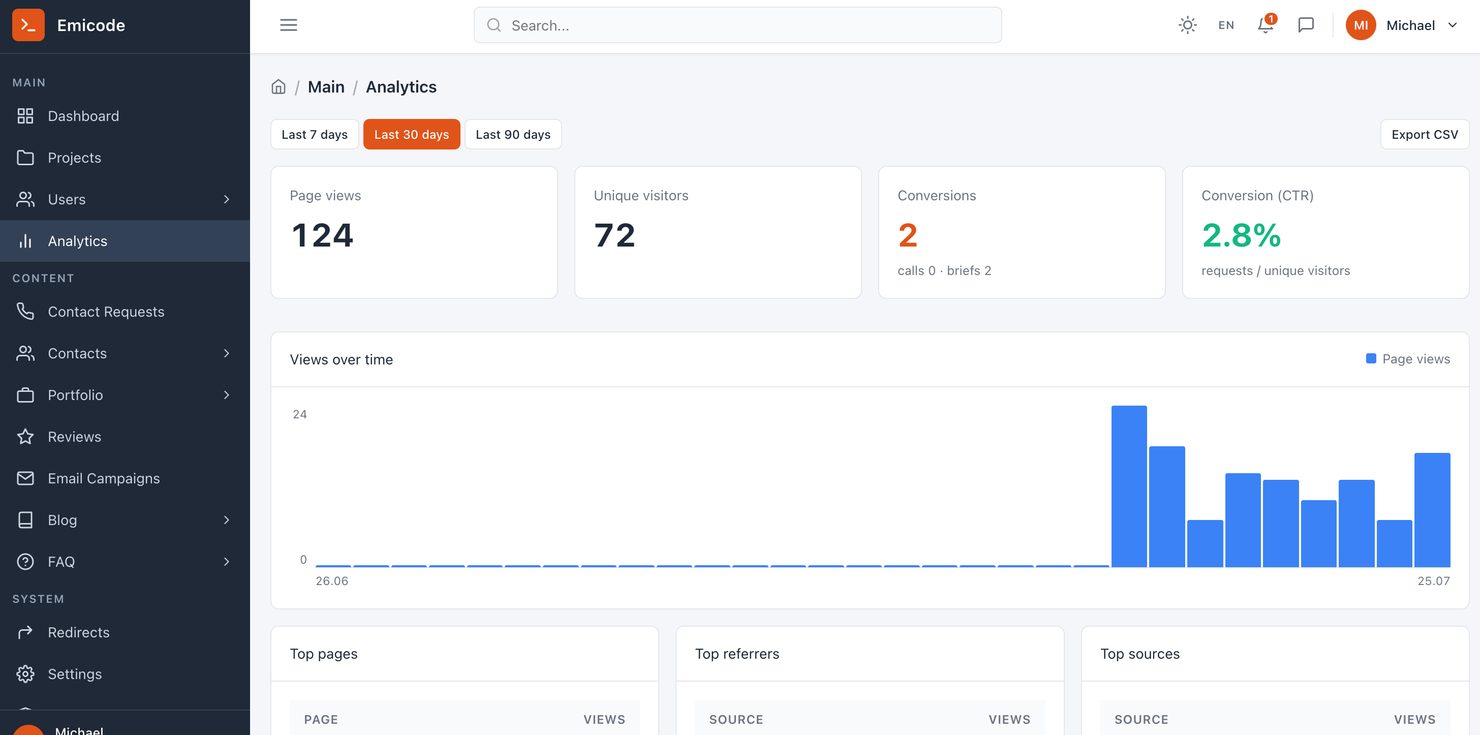
Event collection, consent handling, source attribution — all ours. The data sits in your database, not somebody else's dashboard. It counts more than pageviews. Conversions and CTR on enquiries, both call requests and briefs, compared against the previous period, exportable to CSV. There's an IP blacklist so your own visits and bot traffic don't pollute the numbers — blocked before the tracker even loads. Google Analytics integration exists too, with several gtag destinations and lead events. It's off by default. GA stays a choice rather than a requirement. Being straight about it: this is privacy-first product analytics, not full BI. There are no funnels, cohort analysis or UTM reports yet. If BI is what you need, run Matomo alongside it.
Leads and forms
Brief and call-request forms don't go to an inbox. They go into a status pipeline. An enquiry moves from new to in-progress, and you can see where it is. Anti-spam is ours — FormShield. It comes with something we haven't seen in any form plugin: a headless-browser probe tester that actually verifies the protection fires. Not "we ticked the box" but "we ran the check, here's the result." A new enquiry goes straight to Telegram. Response time is minutes, not "I'll check email tomorrow."
Marketing: campaigns, cross-posting, reviews
Email campaigns. Templates, recipient selection, a rate-limited send queue, delivery statistics, signed unsubscribe links. The subscriber list is yours.
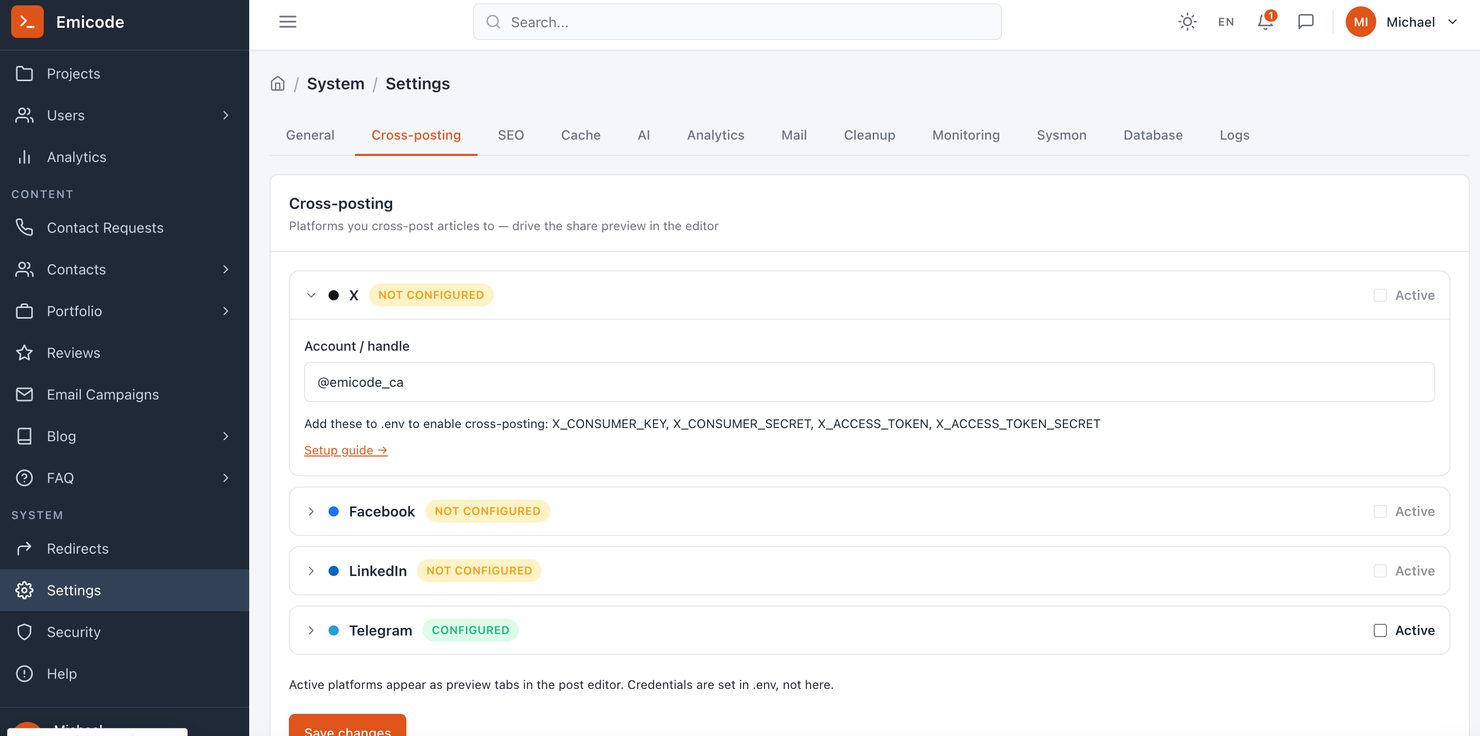
Cross-posting. One publish action goes to Facebook, LinkedIn, X and Telegram, with per-channel formatting, send quotas, retry on failure, and a warning before an access token expires. No Blog2Social, no FS Poster.
Social cards. OG and Twitter markup plus share buttons — you control how a piece looks when someone reposts it.
Google reviews. Synced through Places and Business Profile, with moderation and a landing page widget. Reviews are stored with you rather than just pulled in by somebody else's script.
Security: a layer, not a plugin
Sanctum authentication with two-factor via TOTP and recovery codes. Standard, not a paid add-on. Permissions aren't structured as "admin or not admin." There's a permission catalogue and policies at the domain level: an editor who should only see the blog sees only the blog. Gate::before handles root. Add HTML sanitisation through mews/purifier, a CSRF model, rate limiting on public routes, and our own security audit practice. The key point is what isn't there. No plugin belt — and the plugin belt is the main attack vector on WordPress. The vulnerability rarely comes from core. It comes from an add-on somebody forgot to update.
Media, search, operations
Images. A service with three drivers, WebP variants, presets, watermarking, cropping, and cleanup and regenerate commands. Page weight stays under control without anyone thinking about it.
Search. Live public search across the blog with a dropdown, aggregated admin search across sources, reindexing. MySQL FULLTEXT to start, Elasticsearch as you grow — the application code doesn't change.
Operations. Settings, cache control, database tools, log viewer, and monitoring for queues, scheduled tasks and system resources — all from the admin panel, no SSH for routine work. Plus our own debugbar for development, documentation inside the panel, a bilingual interface (Ukrainian and English) and a dark theme.
Notifications. An internal feed with read states, duplicated to email and Telegram.
Tests. Around 75 Pest files, roughly 530 cases, plus Vitest on the front end. A typical WordPress build has no automated tests at all.
What it costs: full comparison
All competitor figures are in US dollars, from published rates verified July 2026. Emicode figures are in Canadian dollars. Annual calculations assume one mid-size production site.
| Capability | Emicode Platform | WordPress + plugins | Shopify | Webflow + tools | HubSpot CMS |
|---|---|---|---|---|---|
| Core platform / licence | $0 — you own the code | $0 core | $468–4,788 USD/yr | $276–468 USD/yr | $3,600–14,400 USD/yr |
| Content editor | Built in, own WYSIWYG | Gutenberg or paid builder | Built in | Built in | Built in |
| SEO tooling | Built in | ~$99 USD/yr (Yoast) | App required | Basic, add-ons | Built in |
| Structured data (JSON-LD) | Automatic | Plugin | Partial | Manual | Built in |
| llms.txt / AI bot control | Built in | Rare in plugins | No | No | No |
| Security + 2FA | Built in | ~$99 USD/yr | Platform-side | Platform-side | Platform-side |
| Backups | Built in | ~$99 USD/yr | Platform-side | Platform-side | Platform-side |
| Caching / performance | Built in | ~$99 USD/yr | Platform-side | Platform-side | Platform-side |
| Forms + anti-spam | Built in, probe-tested | $50–200 USD/yr | App $50–100 USD/mo | Basic | Built in |
| Lead pipeline with statuses | Built in | Plugin or external CRM | Basic | External | Built in |
| First-party analytics | Built in, your database | GA or Matomo | Platform dashboard | Basic | Built in |
| Email campaigns | Built in | Mailchimp $156–4,200 USD/yr | App | External tool | Built in |
| Social cross-posting | Built in, 4 channels | $120–300 USD/yr | App | Buffer $240 USD/yr or Hootsuite $1,188 USD/yr | Built in |
| Google reviews sync | Built in | Plugin | App | No | No |
| Projects + tasks (CRM lite) | Built in | Plugin or Asana | No | No | Built in |
| Site search | Built in, Elasticsearch-ready | Plugin | Platform-side | Basic | Built in |
| AI actions in editor | Built in, cost-logged | Paid plugin | App | No | Paid add-on |
| Automatic 301 on slug change | Built in, de-loops chains | Plugin | Manual | Manual | Built in |
| Image pipeline (WebP, presets) | Built in | Plugin | Platform-side | Platform-side | Platform-side |
| Automated test coverage | ~530 cases | None typical | Vendor-side | Vendor-side | Vendor-side |
| Managed hosting | From $400 CAD/mo | $360–1,200 USD/yr | Included | Included | Included |
| Third-party gateway surcharge | None | None | 0.6–2% of revenue | N/A | N/A |
| Recurring licence rent | $0 | ~$2,000–2,500 CAD/yr | $468–4,788 USD/yr + % | $516–2,016 USD/yr | $3,600–14,400 USD/yr |
| Who owns the data | You | You | Vendor | Vendor | Vendor |
| Dashboards to check | 1 | 5–8 | 2–3 | 3–4 | 1 |
Sources, verified July 2026: Shopify plan pricing and third-party gateway surcharges from published 2026 rates (Basic $39, Grow $105, Advanced $399 monthly; surcharge 2%, 1%, 0.6% respectively; apps commonly $50–100/mo). WordPress plugin costs from 2026 total-cost breakdowns (SEO, security, backup and caching plugins around $99/yr each; forms $50–200/yr; managed hosting $30–100/mo). Mailchimp from $13/mo Essentials to $350/mo Premium. Buffer from $5 per channel per month; Hootsuite Professional $99/mo on annual billing. The plugin belt figure is our own three-year cost tracking, in CAD.
The economics over time
The number that matters isn't launch cost. It's three years. Over a three-year total cost of ownership, our instance and the WordPress route roughly converge. After that the gap widens in our favour — no licence rent, and every subsequent project reuses what's already written. Platform improvements reach every project at once. Shopify is its own case. The third-party gateway surcharge is a percentage of turnover. At $50,000 USD monthly on the Basic plan, that surcharge alone is $1,000 a month, on top of the subscription and whatever your gateway charges. The cost grows at exactly the rate you do.
Where the usual option is better
This isn't the article where everything else is bad. WordPress wins on three counts, clearly. Launch speed: two to four weeks against our six to ten. Entry cost. And developer availability — there are vastly more WordPress developers on the market than Laravel specialists. If you need a site in two weeks and it won't change much afterward, use WordPress. That's the right answer. Shopify works well while you're on Shopify Payments or while turnover is modest. The fees stay small in that case. We don't compete with $15,000 builds. We're for the businesses that already hit the ceiling on one — the ones that need custom logic, their own data, speed and security, rather than another template.
What's next
Separately, here's what's designed but not yet shipped. We're not presenting these as finished.
A site chatbot answering from your own content. The architecture is ready — the search layer exists, the AI layer exists, what's needed is the connection between them. It answers from your articles, FAQ and portfolio.
An AI agent in the editor. Right now the AI actions are one-shot. An agent mode — describe what to do with a draft and the edits get applied — is a different level.
CRM boards. Canvas and mindmap, SVG and PNG export, task attachments, a client portal. Today the CRM is a light project and task tracker, and that's exactly what we call it.
A public leads API. Webhooks and integration with external CRMs, Zapier and Make.
Who this is for
If you have a working site on a builder and it suits you, leave it alone. The conversation makes sense when at least two of these are true:
- The logic you need can't be assembled from plugins, and the closest ones conflict with each other
- A year of subscriptions adds up to something comparable to a development budget
- Customer and enquiry data has to sit with you, not in a vendor's console
- Security is a requirement from your industry or regulator, not a preference
- The site is growing and every change runs into somebody else's limits
FAQ
Often, yes. If you're spending under roughly $100 a month on subscriptions and your site doesn't need custom logic, the arithmetic doesn't work in our favour and we'll tell you that on the call. The break-even sits where your annual tooling spend starts approaching a development budget, or where the thing you need simply doesn't exist as a plugin.
Framework and dependency updates are handled as part of managed hosting. The difference from a plugin stack is the size of the surface: a WordPress site running fifteen add-ons has fifteen independent codebases from fifteen maintainers, any of which can ship a vulnerability or stop being maintained. We have the framework, a short dependency list, and our own code.
Framework and dependency updates are handled as part of managed hosting. The difference from a plugin stack is the size of the surface: a WordPress site running fifteen add-ons has fifteen independent codebases from fifteen maintainers, any of which can ship a vulnerability or stop being maintained. We have the framework, a short dependency list, and our own code.
Yes — we write the integration directly against the API. There's no per-task subscription and no operation quota. Worth noting the current state honestly: there's no public leads API or webhook layer yet, so integrations are built rather than configured. That's on the roadmap above.
Canadian infrastructure. For anyone handling personal information under PIPEDA or a provincial equivalent, that removes a question you'd otherwise have to answer about cross-border data transfer.
Yes, and this is the part we spent the most time on. The editor has composite blocks — CTA cards, feature grids, callout boxes — that a marketer places without touching markup. The SEO panel and social preview are in the same window. There's documentation inside the admin panel for onboarding new team members.
Six to ten weeks for most projects, against two to four for a WordPress build. That gap is real and it's the main argument against us. If your deadline is tighter than that, say so at the discovery stage rather than at week four.
You keep the site and the code. It's a standard Laravel application, so any competent Laravel developer can pick it up. We'll hand over documentation and access. This is a fair question to ask any studio, and the answer you want is exactly this one — a normal application on a mainstream framework, not something only the original team can read.
Yes. The code for your project is yours. What we reuse across clients is the underlying platform, which is what makes each subsequent build cheaper — but your project, your data and your database belong to you.
No. It's the engine we build client projects on, not a product you download. You get the code for your project and you own it, but there's no self-serve installer, no marketplace, and no plugin ecosystem. If you want something you can install and manage without a development partner, WordPress is the honest answer.